Showing posts with label Research. Show all posts

Sunday, March 8, 2015

I Lied!

Muhaha.


I gave myself two days this spring break to get some ideas out of my head and into code.

Design Talk


    So, as I said in the past, I am dissatisfied with the current state of the 'industry' machines in Femtocraft.  What I mean by that is, all of the machines that are not power machines are getting the boot.  There is no variety in how they're used, and they're used for everything.  My intent is to distribute some of the items to different machines, and incorporate more multiblocks.

    Additionally, I am a fan of non-standard mechanics.  As such, I had a thought.  What if, at every tier, I introduce a new mechanic for all machines of that tier, and possibly later tiers?  Beyond simply power and sticking items in, you would have something else to fiddle with.  And that's what I'm going to do.  Don't worry, it starts off really simple, and you can complete everything in Femtocraft without worrying too much about the fine tuning of these mechanics.  But, you can definitely supercharge your machines/optimize your setup for the tinkerers amongst you.

So, what are these mechanics?  Well, let me start with the first one I made.


Nano

So, This was the first one I thought of, and I feel it fits the technology level of Nano pretty darn well.


What is it?


Lasers!

I know, I know.  Not really an inspired idea, but I have a feeling you'll come around.  So, how do they work?


    Lasers have a strength and a modularity.  By default, the basic laser block consumes nano-tier power and generates a weak unmodulated laser, that goes for a short distance.  You can toggle the direction the laser outputs from the block.  Additionally, you can toggle the direction that the block looks for reflector chambers.  These chambers increase the power usage per tick, but also increase the strength and distance of the projected laser.  And yes, Lasers will set you on fire.

    So, what about modularity you ask?  Well, that's where this block comes in.  


The Modulation Lens Mount block can accept any modulation lens.  All lasers that pass through this block gain the modulation of these lens.  However, different lenses affect the laser differently.  Some may increase the strength of the laser but decrease the distance, or visa versa.

Different machines in the Nano tier might require different laser modulations, and/or accept a different range of laser strengths.  Stronger lasers will work to make them work faster, so long as they're within acceptable bounds.

Along with the lens mount, there are two more blocks to interact with lasers.

This block reflects an incoming laser at either of its configured faces, and puts it at its output.


This block can accept a laser at its main face, and splits the laser into two separate directions, each with half strength.  Alternatively, it can accept two lasers at the secondary faces, and it merges them together at the main face, totalling their strength and averaging their remaining distance.

The default modulation merges with these special modulations to join the special modulation.

However, add two specialized modulations together and their modulations interfere, decomposing them down to the default modulation.


Micro

    So, now that you have an idea of what I mean by 'extra mechanics', let me take a step back a tier.
This is the tier that I had the most trouble with, simply because I didn't know what I wanted to try and model.  Anytime I thought about a mechanical process, I was reminded by n0rw0lf that I had intended to have the micro tier be "Tesla"-ish, with lots of electricity and such.  The mechanical processes I had already committed to the Macro tier (that which comes before Micro, should I expand Femtocraft in that direction.)  

    However, a couple things came to a head this week and I finally got a decent idea out, which got refined by some good discussion in the irc channel (hint hint you should join in!).

    Computation!  Micro machines (and thus, potentially later tiers as well) have a computational requirement to performing certain operations.  For example, if you're decomposing, say, cobblestone, the machine will need to do some calculations to plan out how it's going to do that.  This will be modeled by a certain # of specific types of computation problems that the machine must complete.  The machines will have installed a minimal cpu, so that they are never deadlocked.  However, you upgrade their cpus so that they perform their computations much faster.  Continuing with the example, though, you will only need to perform the calculation for cobblestone once, so long as you continue to only decompose cobblestone.  Once you switch to a new type, the machine will need to compute new plan for decomposition.  

    Later tiers might have new computational problems that need to be solved, requiring newer generations of cpus.  I was thinking of also extending this to the research console.  Thus, technologies will have a computational requirement as well.  Upgrading your cpu increases the rate at which technologies will be researched.  However, again certain technologies may require solving new computational problems that older generations simply may not be able to solve, thus prompting newer generations of cpus in order to continue with your research.

Overall, though, it's pretty much self-contained, and a rather simple mechanic.  It also fits the theme rather well, which is why it quickly gained traction in my mind and is now most probably the micro mechanic (hence why I'm telling you about it now :)
)


Femto


So.  This one is fun.

Thursday, September 18, 2014

News!

Hey guys, just started up grad school again, so my time is going to be whittled away towards homework and other things.  Regardless, I still have progress to report.

Configs!

That's right!  I promised configurability, and now you've got it.  I implemented a registration system to easily register class constants to pull their values from the Femtocraft configuration file.  This means that you can alter things like power usage, ticks to craft, or other values.

I generalized the configurable loading system so that it will even work with instances of classes.  Remember that flexible tech tree plotting algorithm? I'll give you three guesses to how I combined the two.

If you guessed: fully configurable technology tree, you guessed right!

That's right folks.  By default, Femtocraft will generate a technology tree with dependencies, names, recipe hooks, and other things. Set a single false to true in the configs, and instead Femtocraft will parse the Technology section and build up a list of Technology instances from that.  Yes, this means new Technology nodes can be made in the tech tree from configs alone.

Some of you may be worried about how built-in Femtocraft tiles or systems might break if their dependant technologies are removed, but due to the configurability of the classes, the names of technologies that the machines look for can easily be swapped out in the configuration files.


Also, to support more than simple text rendering for Technologies, I also wrote a parsing system.  Mod pack makers or others have a sub-system for rendering things such as Crafting Grids, Assembler Recipe, Temporal Recipe, or Dimensional Recipes anywhere in the description text.


Soon, I will also port over the Femtocraft crafting recipes and other defaults to load from configs as well, offering full customizability to aspiring tinkerers.

Work has not stopped, guys!  Stay tuned for more updates!

Tuesday, April 22, 2014

Technology Tree Cont'd

Well that was fun!

For the most part, the algorithm is finished.  It may require a few tweaks here and there, and will ultimately be slightly customizable by the user in question (i.e. choosing x and y padding), but it will get the job done splendidly.

Well, I won't keep you in the dark any longer.  Bear in mind that this is generated on a per-user basis, however, it attempts to minimize # of connections, then total distance of lines, so it's very likely that most (if not all) of the trees end up looking like this one.

Any node without an icon is simply that - I just havn't gotten around to making art for everything yet.  The color of the line corresponds to the tech of the Technology it's leading towards.

Micro
Nano
Femto
Temporal
Dimensional

Voila.
Hmm...  looking at this now, it might be useful to prune unnecessary prerequisites.

 And here it is, pruned.

Friday, March 14, 2014

Research


Research Computer

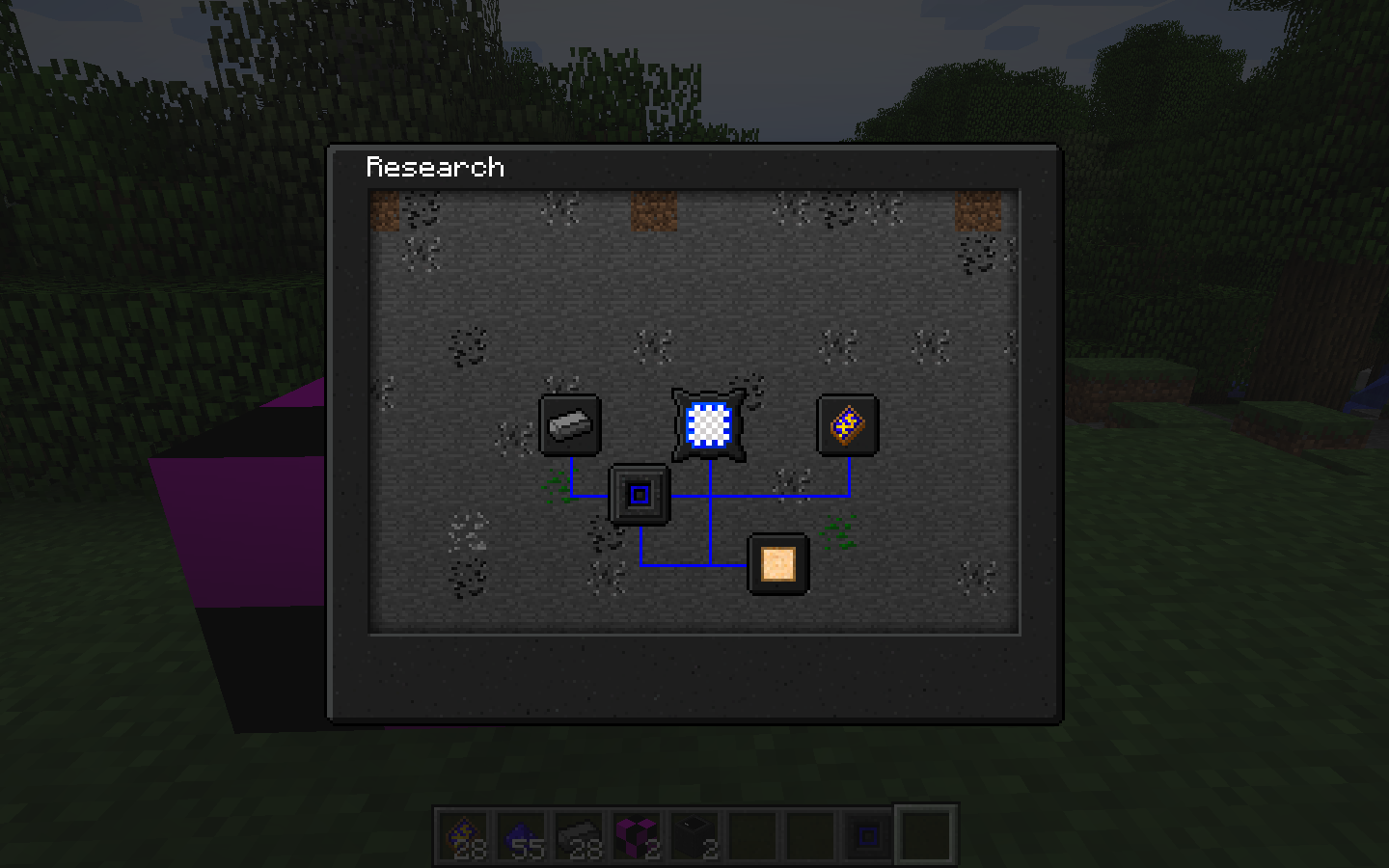
 The research computer serves one simple purpose.  It allows you to view the technology tree as you understand it.  You start with a few technologies, such as knowledge of the new metals, basic understanding of the makeup of materials, and basic circuity.  The computer gives you insight into how the technologies you know may be combined together, with a hint towards what you're working towards.  Thus you can always see what is available for you to head towards next.

Technology

 Technologies are the individual milestones in the research tech tree.  Technologies are either hidden, discovered, or researched.  When all prerequisite technologies are researched, a technology becomes discovered, and visible in the tech tree.  Clicking on the technology at this point will give you a name, a crafting grid, and a small descriptor of what the possibility of this technology is.  Putting the listed materials into a Research Console allows you to create a data card with the information corresponding to this technology, which can be used to unlock it for a player.  Only players who have the technology discovered can use the data card.

Once a technology is discovered, it will give recipe patterns for all of the items associated with this particular technology.  It may also give additional information about the technology as a whole.

Research Console

This is where the research actually happens.  Placing the materials from a discovered Technology into the console, you can begin the process of analyzing these materials.  This takes time, but nothing else.  It will continue even if you walk away from the console.  Once this process is done, you receive a data card that can be used to change the corresponding Technology from discovered to research.

Additionally, certain technologies may generate items as part of the discovery process.  This is often the case when the technology research items correspond to a recipe, or portion of one.  By creating this object, you discover additional uses, and thus, technologies.